Prompt Config
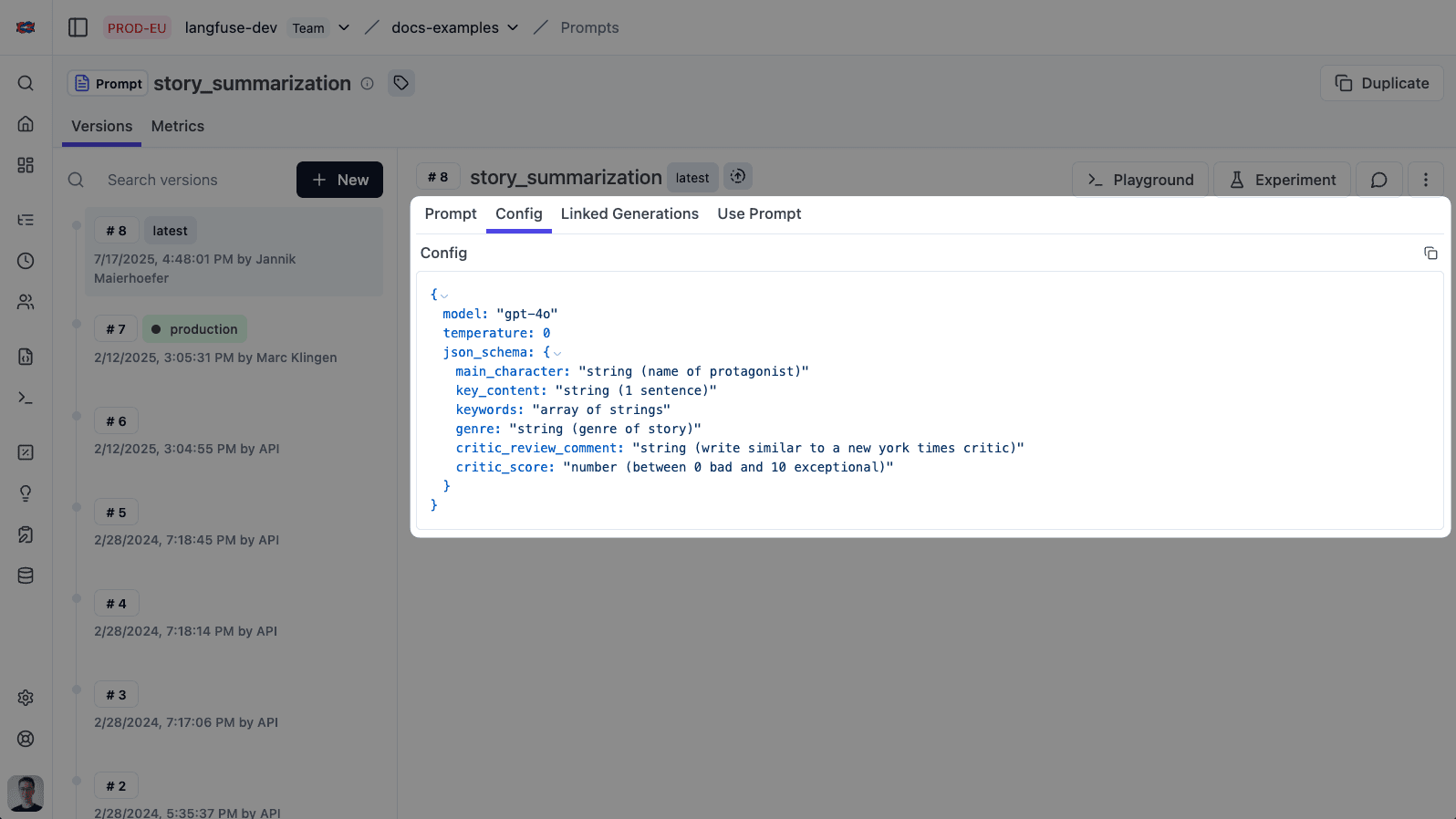
The prompt config in Langfuse is an optional arbitrary JSON object attached to each prompt that stores structured data such as model parameters (like model name, temperature), function/tool parameters, or JSON schemas.
This config is versioned together with the prompt and allows you to manage all parameters associated with a prompt in one place, making it easier to deploy, update, and track prompt behavior and performance across different versions and environments.
Use cases
- Change the model your application uses without touching code
- Manage and version the function/tool JSON schemas your application uses
- Define the JSON schema for your application’s responses
- Set and manage you model parameters such as temperature, top_p, max_tokens, etc.
Cookbooks
The following two example cookbooks demonstrate how to use the config attribute:
Best practices: pass functions and schemas via config
- Structured outputs (JSON schema): Prefer
response_formatwithtype: "json_schema"andstrict: trueto enforce schema. You can store the schema and flags in the promptconfigso they version with the prompt. See also Structured Outputs cookbook. - Function/tool calling: Store
tools(function definitions) and optionallytool_choicein the promptconfig. Tools (aka functions) should define parameters as JSON Schema. - Typed models (Pydantic): If you use Pydantic types, convert them to an OpenAI
response_formatwithtype_to_response_format_param. See OpenAI Python integration. - Model and runtime params: Keep
model,temperature,top_p,max_tokens, etc. inside the promptconfigto switch models and tune behavior without code changes. - Link prompts to traces: Pass
langfuse_prompt=prompton model calls to record the exact prompt version.
Example (Python): Structured output via prompt config
Below, the prompt config contains either a full response_format or a plain json_schema which we wrap into response_format.
# pip install langfuse openai --upgrade
from langfuse import get_client
from langfuse.openai import OpenAI  # drop-in for tracing

langfuse = get_client()
client = OpenAI()

# 1) Fetch prompt (type can be "text" or "chat"; here we build system message manually)
prompt = langfuse.get_prompt("invoice-extractor")

# 2) Prepare system prompt (add your own placeholders)
system_message = prompt.compile()

# 3) Parse config
cfg = prompt.config or {}
model = cfg.get("model", "gpt-4o")
temperature = cfg.get("temperature", 0)

# Prefer using a full response_format if present
response_format = cfg.get("response_format")

# Back-compat: if only a plain json_schema is stored, wrap it
if not response_format and "json_schema" in cfg:
  response_format = {
    "type": "json_schema",
    "json_schema": {
      "name": cfg.get("schema_name", prompt.name or "schema"),
      "schema": cfg["json_schema"],
      "strict": True,
    }
  }

# 4) Call OpenAI
res = client.chat.completions.create(
  model=model,
  temperature=temperature,
  messages=[
    {"role": "system", "content": system_message},
    {"role": "user", "content": "Please extract invoice number and total from: ..."},
  ],
  response_format=response_format,
  # Record prompt version in Langfuse tracing
  langfuse_prompt=prompt,
)

content = res.choices[0].message.content  # JSON string when using response_format
Example config payloads
{
  "model": "gpt-4o-2024-08-06",
  "temperature": 0,
  "response_format": {
    "type": "json_schema",
    "json_schema": {
      "name": "invoice_schema",
      "schema": {
        "type": "object",
        "properties": {
          "invoice_number": {"type": "string"},
          "total": {"type": "number"}
        },
        "required": ["invoice_number", "total"],
        "additionalProperties": false
      },
      "strict": true
    }
  }
}
{
"model": "gpt-4o",
"temperature": 0,
"json_schema": {
"type": "object",
"properties": {
"invoice_number": {"type": "string"},
"total": {"type": "number"}
},
"required": ["invoice_number", "total"],
"additionalProperties": false
}
}Example (Python): Function/tool calling via prompt config
Store your function definitions in config.tools and choose a tool_choice.
# pip install langfuse openai --upgrade
from langfuse import get_client
from langfuse.openai import OpenAI

langfuse = get_client()
client = OpenAI()

prompt = langfuse.get_prompt("weather-agent")
system_message = prompt.compile()

cfg = prompt.config or {}
model = cfg.get("model", "gpt-4o")
temperature = cfg.get("temperature", 0)
tools = cfg.get("tools", [])
tool_choice = cfg.get("tool_choice")  # e.g. {"type": "function", "function": {"name": "get_current_weather"}}

res = client.chat.completions.create(
  model=model,
  temperature=temperature,
  messages=[
    {"role": "system", "content": system_message},
    {"role": "user", "content": "What's the weather in Berlin?"},
  ],
  tools=tools,
  tool_choice=tool_choice,
  langfuse_prompt=prompt,
)
Example config payload for tools
{
  "model": "gpt-4o",
  "temperature": 0,
  "tools": [
    {
      "type": "function",
      "function": {
        "name": "get_current_weather",
        "description": "Get the current weather in a given location",
        "parameters": {
          "type": "object",
          "properties": {
            "location": {"type": "string", "description": "City and country"},
            "unit": {"type": "string", "enum": ["celsius", "fahrenheit"]}
          },
          "required": ["location"],
          "additionalProperties": false
        }
      }
    }
  ],
  "tool_choice": {"type": "auto"}
}Looking for a full end-to-end notebook? See the OpenAI functions cookbook and the Structured Outputs cookbook.